
How to Teach Kids to Use AI Responsibly: A Practical Guide for Parents
The best way to teach kids how to use AI responsibly is to frame it as a creative co-pilot, not an automatic brain that does the thinking for them. This guide skips the passive, one-size-fits-all worksheets and focuses on simple, practical steps that build your child's agency. It's about empowering them to create, question, and learn with AI as a tool they command.
Why Teaching Responsible AI Use Matters Now
AI isn't some far-off concept—it’s already part of our kids' lives, shaping how they play and learn. The challenge isn’t blocking access; it’s building skills. Our goal is to move beyond the screen time debate and help our children become active creators and critical thinkers. You don’t need to be an AI expert. You just need to be present.
This shift from just consuming content to actively creating with it is crucial for raising kids with the agency to navigate a complex world. It’s about teaching them to be the boss of the technology, not the other way around.
The Urgency of Early Guidance
Kids are natural explorers, and AI tools are a fascinating new territory. But without guidance, they can fall into habits of over-reliance. Data shows this is happening fast.
Consider this: in one year, generative AI use among 13- to 18-year-olds in the UK shot up from 37.1% to 77.1%. This highlights a critical teaching moment. If kids don't learn early to double-check AI's answers or spot bias, they're likely to accept whatever it says as fact.
Exploring the current landscape of AI in education can give you a broader context for modern learning.
The core idea is simple: Teach kids to question AI like a curious journalist, not to trust it like an encyclopedia. This mindset is the foundation of responsible use and a key skill for their future.
Core Principles for Family Conversations
Talking about AI ethics doesn't have to be a lecture. You can break down big ideas into simple concepts for the dinner table. Setting this groundwork builds a strong foundation.
Here are three core principles of responsible AI, broken down into age-appropriate talking points.
Key Principles of Responsible AI Use for Kids
| Core Principle | What It Means for Kids (Ages 6-9) | What It Means for Kids (Ages 10-13) |
|---|---|---|
| Fairness | Is the AI being kind to everyone? Sometimes AI learns from unfair things online, so we need to check if its ideas are nice and fair to all people. | Does the AI's answer treat all groups of people fairly? We should look for stereotypes or one-sided views and ask the AI for a more balanced perspective. |
| Accountability | Who's the boss? Remember, a person made the AI, and you're the one using it. The AI doesn't have feelings or take responsibility—that’s our job. We are always in charge. | Who is responsible for the final work? If you use AI for homework, you're still the one accountable for the answer. It's your job to check the facts and make it your own. |
| Transparency | How does the AI know things? It reads tons of information from the internet. That's why it sometimes gets things wrong or makes up "facts." It’s not thinking; it’s just predicting words. | Where did the AI get this information? We should ask it for its sources. Understanding that it’s pulling from a vast dataset helps us see why it might "hallucinate" or have gaps in its knowledge. |
Starting these conversations early normalizes the idea that AI is a powerful tool requiring thoughtful human direction. By focusing on agency, we prepare our kids not just to use AI, but to command it with purpose and integrity.
Setting Your Family's AI Guardrails
You get the why. Now for the how. Creating a safe space for your kids to explore AI isn't about locking things down. It’s about setting up a few simple, common-sense guardrails that empower them to become smart, critical thinkers—not just passive consumers.
Think of these as your family’s foundational habits for any new technology. They turn abstract ideas like "fairness" and "accountability" into concrete actions you can start using tonight.
This isn't just a nice-to-have; it's a necessity. A whopping 72% of students aged 9-17 are hungry for more AI education, but only about one in three schools are actually teaching it. This leaves parents on the front lines, with kids using powerful tools daily without a clear framework.
The Human in the Loop Rule
If you only remember one rule, make it this one: a human must always be in the loop. It’s the simplest and most important guardrail.
This just means an adult is aware of what tools are being used and is part of the process, especially for younger kids. It’s not about hovering, but being an active co-pilot in their digital explorations.
This serves two crucial purposes:
- Safety: You can make sure they’re on age-appropriate tools and not accidentally sharing personal information.
- Agency: It opens the door for you to ask great questions that build critical thinking, turning a quick AI query into a real learning moment.
A simple way to make this happen? Designate a specific spot for AI projects, like the kitchen table, where you can be present and engaged.
Building Your Household AI Checklist
To teach kids responsible AI use, make the rules impossible to ignore. A family checklist, stuck right on the fridge next to the grocery list, turns abstract concepts into everyday habits.
Here’s a sample checklist you can adapt:
- AI is a tool, not a friend. We don’t tell chatbots our secrets or personal feelings.
- Never share personal info. This means our full names, our school, where we live, or any passwords.
- Always double-check the facts. AI makes stuff up, so we always use another source to check important info.
- Give credit where it’s due. If we use an idea or an image from an AI, we say so.
- Ask a grown-up first. We always check before trying a new AI tool or website.
This approach makes safety a shared responsibility. We dive deeper into this in our guide on whether ChatGPT is safe for kids.
Practical Scripts for Tricky Conversations
Knowing what to say in the moment can make all the difference. You don’t have to be a tech wizard; you just need a few go-to phrases to guide your child’s thinking.
Parent Script: "That's a great start from the AI. Now, how can we make it your own? What details would you add to give it your unique voice?"
See what that does? It reframes the AI from an answer machine into a brainstorming partner. It reinforces that your child's creativity and judgment are what truly matter.
Here are a few more scripts to keep in your back pocket:
- When they get a weird or biased answer: "That’s interesting. Why do you think the AI gave that answer? Does it seem fair to everyone?"
- When they want to copy-paste: "Show me the part you liked best. Let’s talk about that idea and then write it in your own words."
- When they treat the AI like a person: "It’s really good at sounding human, isn't it? Just remember, it’s a computer program following instructions, not a person with real feelings."
By setting these clear guardrails and using simple, consistent language, you’re actively building the habits of a responsible digital citizen—someone with the agency to use AI as a powerful tool for learning and creation.
Hands-On Quests to Build AI Skills
Talking about responsible AI is one thing; building the skills is another. The best way for kids to learn is by doing. Forget passive worksheets—these short, high-agency "quests" are designed to turn theory into action.
Each of these activities is simple enough to try tonight. They transform abstract concepts like bias and verification into tangible skills and empower your child to be a creator, investigator, and editor—not just a passive user.
Quest 1: The AI Story Co-Pilot
This quest teaches a vital lesson: AI is a brainstorming partner, not the final author. The goal is to collaborate with an AI to write a story, then actively improve its generic output. This reinforces your child's creative control and shows them who's in charge.
- Because you like… Making up amazing stories.
- Target Skill: Creativity.
- Constraints:
- Time: 20 minutes.
- Materials: A device with access to a family-approved chatbot.
- Safety: Use a child-safe AI tool; an adult is nearby.
- No-Kit Option: Write a story together on paper, with the parent acting as the "AI" by suggesting silly plot points that the child has to make better.
Here's how to run the quest:
- Give the AI a Spark: Start with a simple, creative prompt. Try: "Write a short story about a friendly robot who discovers a magical garden on Mars."
- Read and Review v1: Read the AI's first draft together. Point out that it’s a good start, but it’s missing their special touch.
- Add Your Twist: Brainstorm three specific details to make the story unique. Maybe the robot is powered by strawberry jam, or the garden grows musical flowers.
- Create a New Prompt: Write a new prompt that includes those unique details. For example: "Rewrite the story, but this time the robot runs on strawberry jam and the flowers in the garden play different songs."
- Refine and Finalize: Edit the AI's second version (v2) together. Change words, add your own sentences, and give it a personal voice that feels like yours.
Parent Script: “What changed between v1 and v2? Show me the biggest improvement you made.”
Quest 2: The AI Fact-Checker Challenge
This quest builds critical thinking by teaching kids to treat AI-generated information with healthy skepticism. The mission: catch the AI in a lie (or confirm it’s telling the truth) by verifying its "facts" with trusted sources. This shows that the human user is always accountable.
- Because you like… Learning new facts about animals, history, or space.
- Target Skill: Research.
- Constraints:
- Time: 20 minutes.
- Materials: An AI chatbot and a separate browser tab open to a kid-safe search engine or online encyclopedia.
- Safety: Supervise online searches to ensure they stay on trusted sites like Wikipedia for Kids or National Geographic Kids.
- No-Kit Option: Look up a topic in a physical encyclopedia and compare it to what a family member "knows" about it. See who's right.
Here's how to run the quest:
- Ask the AI for Facts: Prompt the AI with a factual question. For instance: "Tell me three interesting facts about the blue whale."
- Identify Claims to Verify: Read the AI’s response. Pick one specific fact to investigate, like its claim about the whale's heart size.
- Begin the Investigation: Open a separate browser tab. Use a reliable source to search for the same fact. This is a great time to talk about what makes a source trustworthy.
- Compare and Contrast: Did your trusted source confirm the AI's fact? Or was the AI confidently wrong? This is a common issue known as an AI "hallucination."
- Document Your Findings: Grab a piece of paper and write down whether the AI was correct, incorrect, or just a little bit off.
Here's a quick guide for navigating common hiccups.
Troubleshooting Common AI Issues with Kids
| If This Happens... | Try This Solution... |
|---|---|
| The AI gives a weird or inappropriate answer. | Close the window. Use it as a teachable moment: "See? The AI doesn't have a real brain and can make mistakes. That's why a grown-up is always nearby." |
| Your child gets frustrated the AI isn't "getting it." | Frame it as a communication challenge. "The AI is like a robot that only understands specific instructions. How can we rephrase our prompt to be clearer?" |
| They start treating the AI like a person. | Gently remind them it's a tool. "It’s fun to talk to, but remember, it's a computer program. It doesn't have feelings like we do." |
| They want to use the AI to do their homework. | Set a clear boundary. "AI is a great starting point for ideas, but the final work has to be in your own words. Let's use it to brainstorm, then you can write your sentences." |
These moments are the best opportunities for real learning.
Quest 3: The AI Art Director
This activity is about learning to communicate with precision. Kids will iterate on prompts for an AI image generator, discovering that small changes in their words lead to huge differences in the final picture. It’s a fun, visual way to practice persistence and clear communication. As kids explore, understanding the range of available AI content creation tools is crucial.
- Because you like… Drawing and creating cool pictures.
- Target Skill: Communication.
- Constraints:
- Time: 20 minutes.
- Materials: Access to a family-approved AI image generator.
- Safety: Ensure the tool has content filters appropriate for children and that you review the terms of service.
- No-Kit Option: One person describes an imaginary creature in detail while the other draws it, refining the drawing based on more specific descriptions.
Here's how to run the quest:
- Create a Simple Prompt (v1): Start with a basic idea. For example: "a cat astronaut."
- Analyze the Output: Look at the first image. What’s missing? Is the helmet right? What does the background look like?
- Write a Detailed Prompt (v2): Now, get specific. Add descriptive words, styles, and details. Try: "A fluffy ginger cat wearing a shiny silver astronaut helmet, floating in space with colorful planets in the background, cartoon style."
- Compare the Versions: Place the v1 and v2 images side-by-side. Talk about what changed and why the second, more detailed prompt worked so much better.
For families who enjoy this project-based approach, Kubrio is a family-driven learning platform that uses AI to turn your child’s interests into step-by-step quests with feedback and a living portfolio.
Developing Critical Thinking for the AI Era
Once you have basic safety rules in place, the real work begins. The most important skill we can teach our kids isn’t how to prompt an AI, but how to question it. This isn't about blocking technology; it’s about building a critical mindset that turns them into active investigators instead of passive sponges.
Our goal is to cultivate healthy "AI skepticism" from the start. We want them to see an AI response as the first step in a thought process, never the final answer. This is a huge shift from the legacy school model where kids were expected to just consume facts.
From User to Investigator
To get kids using AI responsibly, we need to frame them as detectives. Their job is to find clues, question the witness (the AI), and form their own conclusions. This approach hands them agency and makes critical thinking feel like a fun challenge.
You don't need a formal lesson plan. It begins with simple, consistent conversation prompts you can use anytime your child interacts with an AI.
- Why do you think the AI gave that answer? This nudges them to think about the AI’s training data.
- Could this information be biased? This introduces the idea that AI outputs aren't neutral—they reflect biases from the text they learned from.
- What's one thing the AI might have missed? This reinforces that AI lacks real-world context and prompts kids to mix in their own knowledge.
- How could we check if this is true? This directly teaches the habit of verification, a cornerstone of digital literacy.
By weaving these questions into everyday chats, you make skepticism a normal, healthy habit.
The Growing Need for Parental Guidance
This hands-on guidance at home is more critical than ever, as many schools are still playing catch-up. A recent survey from K12 Dive revealed a startling gap: while 64% of high school students use AI for tutoring, only 48% have received any guidance from their school on how to use these tools critically.
This is where we, as parents, have to step in.
The most powerful lesson you can teach your child is this: The AI is a powerful calculator for words, but you are the one who does the thinking. This simple framing keeps them in the driver's seat.
If you like project-based learning but want it doable at home, Kubrio handles the planning and feedback so you can focus on building and reflecting together.
Turning Skepticism into a Creative Habit
Healthy skepticism isn't about being negative; it's about being curious. It's the engine of creativity. When kids learn to question AI, they also learn to trust their own unique point of view.
Here’s a simple "remix" activity you can try this afternoon:
- Ask an AI to generate a poem about a familiar topic, like "rainy days."
- Read the poem together and ask, "What does this poem get right, and what feeling is it missing for you?"
- Challenge your child to rewrite two lines of the poem to add their personal experience—maybe the smell of wet pavement or the sound of rain on their window.
This small act of editing is an exercise in agency. It teaches them that their voice, ideas, and critical eye are what ultimately create something valuable. This is how we move them from being passive consumers to confident creators in an AI-assisted world.
Turning AI Projects Into a Living Portfolio
The real magic happens when your child’s AI explorations stop being one-off activities and start telling a story of their growth. Capturing these projects builds confidence and creates tangible proof of progress.
This simple shift moves learning away from the old model of disposable worksheets and toward building a meaningful collection of work that shows how far they've come.
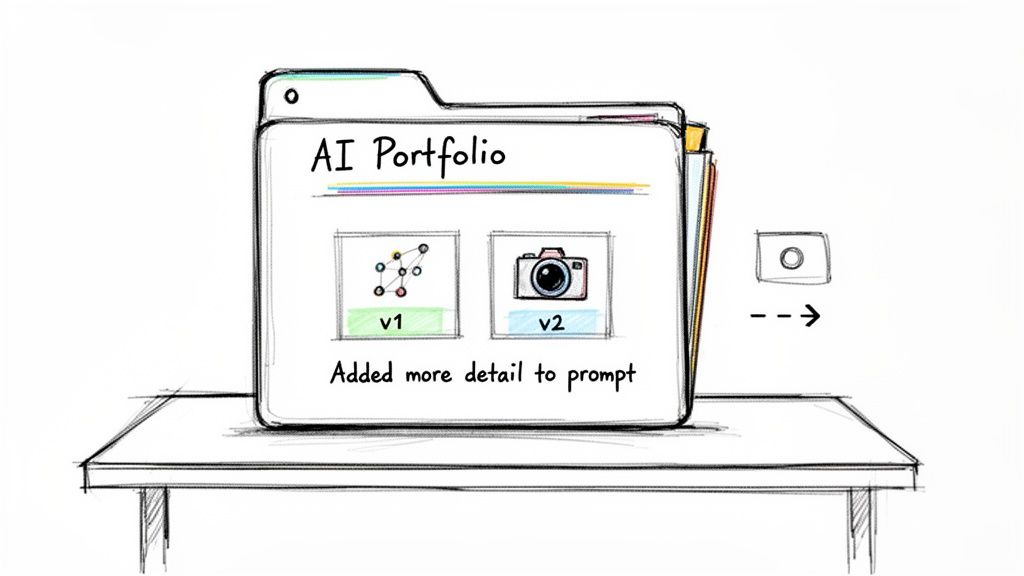
A living portfolio isn't a scrapbook of "good job" stickers; it's a timeline of effort, iteration, and skill development. It makes progress visible, which is incredibly motivating for kids.
From Single Project to Visible Progress
The core idea here is to capture the process, not just the perfect final product. Learning how to teach kids to use AI responsibly is grounded in showing them that their thinking and revisions are what truly matter.
Documenting this journey can be simple and takes less than a minute.
- Capture a "Before and After": Snap a quick screenshot of the AI's first attempt (v1) and place it next to your child’s improved version (v2).
- Add a One-Line Reflection: Ask, "What changed between v1 and v2?" Their answer is the perfect caption.
This simple act transforms a fun activity into a powerful artifact. It shows them, in a concrete way, that their input and critical thinking made all the difference.
Making the Portfolio Tangible
You don't need fancy software. A simple digital folder or physical notebook can work perfectly. The key is being consistent.
Here’s what an entry might look like for an AI art project:
Artifact: A side-by-side comparison of two images. Caption: "Neighborhood map v2 — added symbols and a key after testing the route."
Or for a story they’re co-writing with an AI:
Artifact: A screenshot of the original AI paragraph next to their rewritten version. Caption: "AI story v2 - changed the robot’s name to Zorp and gave him a much funnier personality."
These small entries stack up over time, creating a rich story of their developing skills in communication, creativity, and critical thinking. It’s powerful evidence of their growing agency.
Platforms like Kubrio help automate this. Start from any spark—dinosaurs, video editing, chess tactics. Kubrio drafts right-sized quests (10, 20, or 45 minutes) and guides you on what feedback to give. Finished work saves to a portfolio so growth is simple to see and share.
Why a Portfolio Builds Agency
A portfolio does more than track projects; it shifts your child’s mindset from being a consumer to a creator and a curator of their own learning journey. It reinforces that their effort and reflection are the most valuable parts of any project.
When a child can look back and say, "I remember when I couldn't do that, but look at what I did here," they build a deep, unshakable sense of competence.
This is how we teach kids to use AI responsibly—by making their own intellect and creativity the hero of every story.
Your Questions, Answered
As you start exploring AI with your kids, questions are going to pop up. Here are some of the most common ones we hear from parents, with straightforward answers.
What’s the Right Age to Start Talking About AI?
Sooner than you probably think. The conversation can begin the moment your child starts using technology that runs on AI.
For 6 to 9-year-olds, keep it simple. Explain that AI is like a little helper inside an app that "guesses" what you want next. Add that it doesn't have a real brain, so it can make silly mistakes.
With kids ages 10 to 13, you can get into more complex ideas. This is the perfect time to talk about how AI learns from the internet, and why that means it can sometimes be biased or just plain wrong. Frame AI as a powerful tool that needs a smart human—your child—in the driver's seat.
How Can I Keep an Eye on Their AI Use Without Being a Helicopter Parent?
This is about creating an open, collaborative vibe at home. The "Human in the Loop" rule is your secret weapon.
Instead of secretly checking their search history, make AI-powered activities a family thing. Encourage them to use these tools in a shared space, like the living room, where you can be present without hovering.
Your involvement should feel like genuine curiosity, not an inspection. Try asking questions like, "Whoa, that's cool. Can you show me how you got it to do that?" This builds trust and turns monitoring into a shared experience.
What if My Child Wants to Use AI for Their Homework?
This is a golden opportunity to teach accountability. Draw a clear line between using AI as a helpful assistant and letting it do the thinking for them.
Establish a simple household rule: AI can be a brainstorming partner, but it can never be the final author.
For instance, they could ask an AI to suggest a few different opening sentences or outline some potential ideas. But the actual writing, the critical thinking, and the final product must be their own work. This teaches them to use AI for what it excels at—generating possibilities—while reinforcing that the real, valuable work of learning belongs to them.
Are There Any Kid-Safe AI Tools You Recommend?
The world of AI tools is moving incredibly fast. Instead of a list that could be outdated next week, it's more powerful to learn how to vet these tools yourself.
Before letting your child on a new AI platform, run through this quick checklist:
- Does it require an account with personal info? If it does, be careful. Always use a parent's email to sign up.
- Does it have obvious content filters? Look for tools specifically designed for education or family use.
- What’s the data privacy policy? If it's vague about how it uses your data, steer clear.
A quick search for "AI tools for kids" or "family-friendly AI" is a good place to start, but always do your own five-minute review. This process also models fantastic digital citizenship for your child.
For a more structured approach, a platform like Kubrio can be a great option. It’s a family-driven learning platform that integrates AI tools within a safe, guided environment, helping turn your child’s natural interests into hands-on learning quests.